
The 7 Best AI Coding Assistants in 2026: GitHub Copilot, Cursor, Devin Desktop, Amazon Q, Cody, Replit Agent, and Tabnine Compared
GitHub Copilot, Cursor, Devin Desktop, Sourcegraph Cody, Amazon Q Developer, Replit Agent, and Tabnine, ranked honestly on ecosystem reach, agent maturity, pricing, and roadmap durability — with real pros and cons for each.


The 7 Best AI Coding Assistants in 2026: GitHub Copilot, Cursor, Devin Desktop, Amazon Q, Cody, Replit Agent, and Tabnine Compared
The seven strongest AI coding assistants in 2026 — GitHub Copilot, Cursor, Devin Desktop (formerly Windsurf), Sourcegraph Cody, Amazon Q Developer, Replit Agent, and Tabnine — ranked on what they actually ship, not on marketing copy.
Every one of these tools now claims to write, review, and even deploy code with minimal human input. The differences that matter are quieter: which ones run inside the IDE you already use, which ones can execute a multi-step task unattended and actually finish it, what a genuinely free tier looks like versus a bait-and-switch trial, and whether the vendor's own roadmap suggests the product you adopt today still exists in the form you bought it in eighteen months from now. This roundup ranks all seven against those questions, with a real pro and a real con for each — including the one, Devin Desktop, that quietly changed its name in the middle of 2026.
How we picked these
We ranked all seven on four factors weighted toward what predicts long-term usefulness rather than a single benchmark score: breadth of IDE and ecosystem reach; how far each tool's "agent" capability actually goes toward finishing a multi-step task unattended; whether pricing is transparent and a free tier is genuinely usable rather than a stripped-down trial; and the durability of each vendor's roadmap, including any announced deprecations or rebrands. Vendor-reported coding benchmarks vary enough in methodology that we treated them as supporting evidence, not the primary ranking signal — documented product behavior and the vendor's own public statements carried more weight.
1. GitHub Copilot
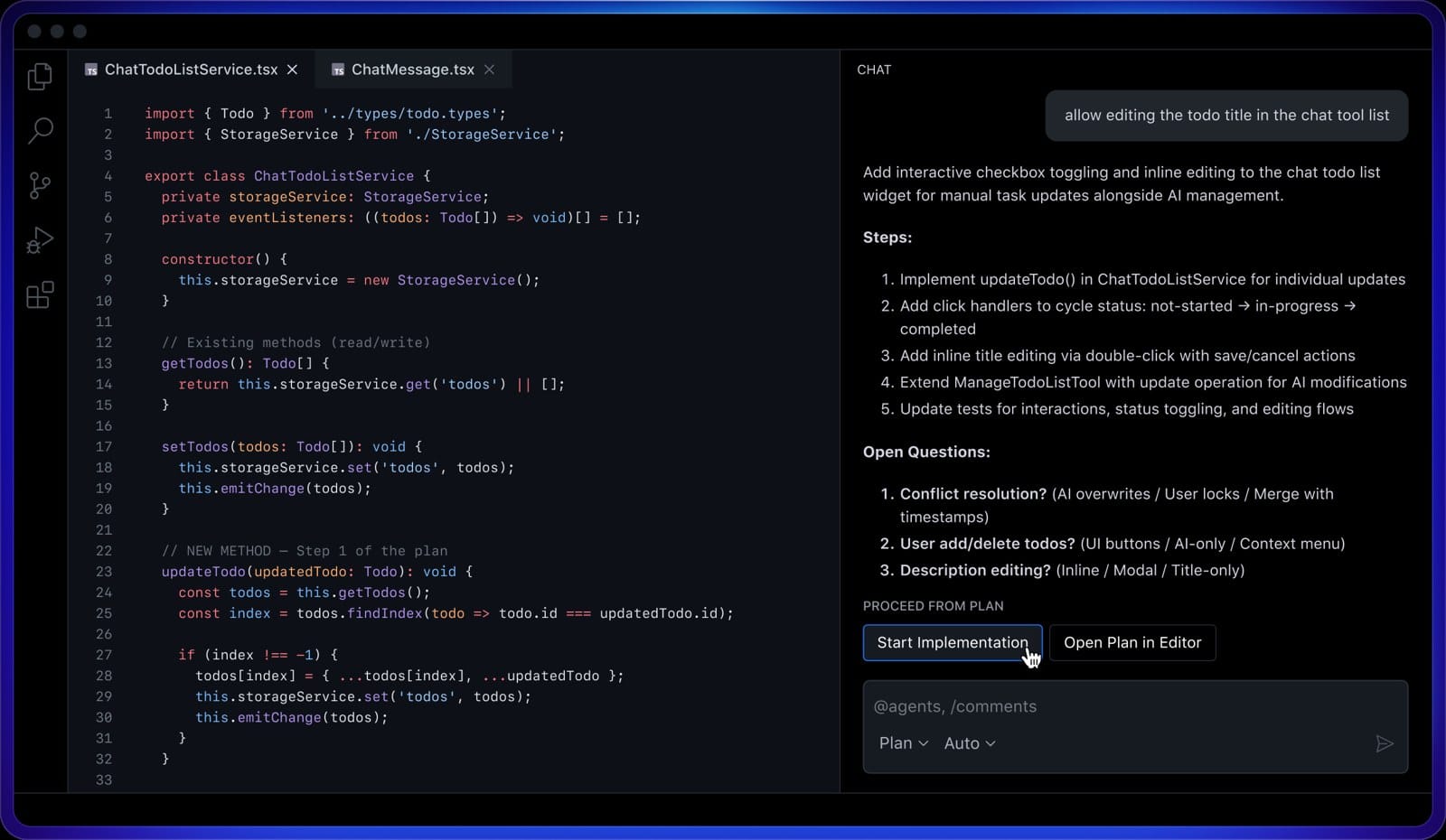
GitHub Copilot is Microsoft/GitHub's AI pair programmer, and it reaches more places than anything else on this list: VS Code, Visual Studio, JetBrains IDEs, Xcode, Neovim, Eclipse, and GitHub.com itself. It ships Plan Mode, where the agent proposes a blueprint you approve before it starts editing, and Agent Mode, which makes multi-file changes, runs tests, and validates results across a codebase. New in 2026, Copilot Pro+ and Enterprise subscribers can run third-party agents — Anthropic's Claude and OpenAI's Codex — from inside the same subscription and editor window, rather than juggling separate accounts. GitHub also says a new retrieval model it shipped in September 2025 lifted a benchmark score from 0.484 to 0.670 while shrinking the index eight-fold, which should show up as faster, more relevant chat answers on large repos.
Best for: Teams already standardized on GitHub who want an assistant available in every IDE they touch.
Pros:
Widest IDE and editor support of any tool here. Can run Anthropic's and OpenAI's own coding agents from inside one subscription. Deep native integration with GitHub Issues and pull requests for background agent work. A measurably improved retrieval model behind chat and search.
Cons:
Heavy users burn through premium-request quotas, and overage is billed per request. The most useful multi-agent routing is gated to Pro+ and Enterprise tiers. Agent Mode still trails dedicated agent-first editors on fully autonomous, end-to-end task completion in independent testing.
2. Cursor
Cursor, built by Anysphere, is a standalone VS Code-based editor designed around agents from the start rather than retrofitted onto one. Its Agent Mode can analyze a codebase, make multi-file changes, run tests, and — as of Cursor 3.1 in April 2026 — take screenshots and control a browser to visually verify its own frontend changes. Cloud Agents let you kick off a task from cursor.com/agents on any device, and a multi-agent mode runs several agents on different subtasks in parallel. Model choice spans Anthropic, OpenAI, Google, and xAI's Grok 4.6, with a "Cursor Router" that can pick automatically.
Best for: Developers who want the most autonomous, editor-native agent experience and are comfortable managing usage-based costs.
Pros:
Purpose-built agentic editor rather than a bolt-on extension. Browser control lets the agent visually verify its own UI changes. Strong multi-agent and parallel-task support. Broad model choice, including Grok 4.6.
Cons:
Billing has shifted toward usage-based charges on frontier models, and heavy agent use can add up fast. Migrating an existing VS Code setup — extensions, keybindings — takes real effort. Being a separate editor means teams standardized on plain VS Code plus Copilot face a real switching cost.
3. Devin Desktop (formerly Windsurf)

On June 2, 2026, Cognition — maker of the autonomous coding agent Devin — rebranded Windsurf, the AI-first editor it acquired via its 2025 purchase of Codeium, into Devin Desktop. The change shipped as an over-the-air update: existing Windsurf users kept their account, plan, extensions, and keybindings without having to reinstall anything. Cognition now frames the product as "a full IDE with an agent manager built in, not the other way around," spanning four surfaces under one brand — Devin Desktop (the editor), Devin Cloud (autonomous background work), Devin CLI, and Devin Review. It also shipped the Agent Client Protocol, which lets Codex, Claude Agent, and Devin itself run inside the same window and be swapped mid-session. The editor's signature agentic workflow, Cascade, including its "Turbo Mode" for auto-applying suggested terminal commands, carried over unchanged from Windsurf.
Best for: Teams who want one IDE that can run Devin, Codex, and Claude Agent interchangeably rather than betting on a single vendor's model.
Pros:
Single interface for running multiple agent backends rather than being locked to one vendor. Devin Cloud offers a genuine autonomous-background-task option for longer-running work. Existing Windsurf users migrated with zero setup loss. Cascade's Turbo Mode measurably speeds up terminal-heavy workflows.
Cons:
The rebrand itself created real confusion — searches for "Windsurf" now land on a differently named product, and some third-party tutorials still reference the old name. Full autonomous Devin Cloud capability sits behind a paid tier above the base editor. The Agent Client Protocol ecosystem is newer and smaller than Copilot's multi-IDE reach.
4. Sourcegraph Cody

Cody's differentiator is depth of context, not breadth of features: it's built around Sourcegraph's cross-repository code search. By default, a new Cody chat opens with context chips for the current file and repository, which you can edit, remove, or replace by @-mentioning specific files, symbols, or remote repositories. Since 2025, Cody chat also accepts image uploads — screenshots, architecture diagrams, UI mockups — for vision-capable models like Claude Opus 4.1 or GPT-4o. Its "Smart Apply" feature inserts suggested code directly into open files and can execute suggested terminal commands, defaulting to a fast Qwen 2.5 Coder model to keep insertion latency low. Full chat and context features require a Sourcegraph Enterprise account.
Best for: Enterprises with large, complex, multi-repository codebases who already run — or are willing to run — Sourcegraph's code-search platform.
Pros:
Strongest cross-repository context-retrieval story on this list, useful in large monorepos. Supports image-based questions like error screenshots and architecture diagrams. Smart Apply's dedicated fast model keeps code insertion snappy. Available across VS Code, JetBrains, Visual Studio, and the Sourcegraph web app.
Cons:
Full capability now requires a paid Sourcegraph Enterprise account, a bigger commitment than a simple individual subscription to Copilot or Cursor. Smaller plugin and agent ecosystem than the category leaders. Less emphasis on fully autonomous multi-file agent execution compared with Copilot's Agent Mode or Cursor.
5. Amazon Q Developer
Amazon Q Developer is AWS's generative AI assistant for building software, and it's the tightest fit on this list for cloud-native teams: it reasons well over AWS SDKs, CDK and CloudFormation, and AWS-specific error messages, and it's usable directly from the AWS console as well as from an IDE. It offers a genuinely functional free tier alongside a paid Pro tier with expanded chat, code review, and agentic task limits. One roadmap fact matters for anyone adopting it now: AWS has announced it will retire the standalone Q Developer IDE plugins for VS Code and JetBrains on April 30, 2027, folding that functionality into Kiro, AWS's newer spec-driven agentic IDE.
Best for: Teams heavily invested in AWS who want a free, cloud-aware assistant — with eyes open about the coming Kiro migration.
Pros:
Free tier with real functionality, not just a time-limited trial. Unmatched context on AWS-specific services and error messages among the tools here. Integrates naturally with the AWS CLI, CDK, and existing AWS accounts. Usable directly from the AWS console, not only inside an editor.
Cons:
The announced April 2027 retirement of the IDE plugins in favor of Kiro means teams adopting today's form face a forced migration within about a year. Value narrows sharply for teams that aren't deep in AWS. Multi-file autonomous agent workflows are less mature than Copilot's or Cursor's.
6. Replit Agent

Replit Agent is built to go from a natural-language prompt to a running, deployed application entirely in the browser, with no local environment setup. It scaffolds the project, writes the code, provisions a database when needed, and can deploy the result, with Replit handling hosting. It's aimed less at augmenting work inside a large, pre-existing codebase and more at rapid prototyping, internal tools, and letting non-specialist builders ship working software.
Best for: Solo builders, prototypers, and teams who want a working, hosted app fast without managing their own infrastructure.
Pros:
Zero local setup — the whole workflow runs from a browser. Handles the full loop from a prompt to a hosted, running app. Strong fit for prototyping and internal tools. Approachable for people who aren't professional engineers.
Cons:
Agent compute is usage-based and can get expensive for longer or more complex builds. Less suited to working inside a large, pre-existing enterprise codebase than Copilot, Cursor, or Cody. Tied to Replit's own hosted environment, which means less portability than a tool that plugs into infrastructure you already run.
7. Tabnine

Tabnine's pitch is enterprise control and privacy rather than the most autonomous agent on the market: on-prem, VPC, and air-gapped deployment options; a proprietary code-focused model trained on permissively licensed code; and zero data retention by default for Tabnine Chat. It covers the major IDEs — VS Code, JetBrains, Eclipse, Visual Studio — with completions and a chat interface for generating snippets, writing tests, documenting code, and debugging.
Best for: Regulated industries and enterprises that need on-prem or air-gapped AI coding assistance.
Pros:
Strongest privacy and compliance story on this list, with self-hosted and air-gapped options for regulated industries. Zero data retention by default. Works across all the major IDEs. A proprietary model trained on permissively licensed code sidesteps some licensing concerns teams have with general-purpose coding LLMs.
Cons:
Agentic, autonomous capabilities are noticeably less developed than Cursor's, Copilot's, or Devin Desktop's — Tabnine remains closer to a completion-and-chat tool. Smaller public benchmark presence than the category leaders makes head-to-head quality comparisons harder. The enterprise/private-deployment focus makes it a less obvious pick for a solo developer who just wants a free public-cloud assistant.
How to choose
If you're already standardized on GitHub, start with Copilot — it reaches every IDE you're likely to use and now lets you run Anthropic's and OpenAI's own agents from the same subscription. If you want the most autonomous, agent-native editing experience and don't mind usage-based billing, Cursor and Devin Desktop are the two to trial side by side; Devin Desktop's edge is running multiple agent backends interchangeably, while Cursor's is browser-controlled visual verification. Teams with large, multi-repository codebases should put Sourcegraph Cody on the list specifically for its context retrieval, accepting the Enterprise-account commitment that comes with it. If your stack is AWS-centric, Amazon Q Developer's free tier is hard to beat today, but plan around the April 2027 Kiro migration. For prototyping or shipping a working app without managing infrastructure, Replit Agent is the most end-to-end option. And if your constraint is regulatory — data residency, air-gapped environments, zero retention — Tabnine is the clearest fit among the seven.
FAQ
What is the best AI coding assistant for large enterprise teams?
For enterprises already on GitHub, GitHub Copilot's Business and Enterprise tiers offer the widest editor reach. Teams with large, complex, multi-repository codebases that need deep code-search grounding should also evaluate Sourcegraph Cody, which is built specifically around enterprise-scale context retrieval.
Is there a genuinely free AI coding assistant?
Yes. Amazon Q Developer's free tier is functional rather than a stripped-down trial, and GitHub Copilot also offers a limited free individual tier. Tabnine and Cursor both offer free tiers with more limited completions or requests.
What happened to Windsurf?
Cognition, the company behind the autonomous coding agent Devin, rebranded Windsurf to Devin Desktop on June 2, 2026, after acquiring Windsurf's parent company Codeium in 2025. Existing Windsurf users kept their accounts, plans, and settings; the product now sits alongside Devin Cloud, Devin CLI, and Devin Review as one branded family.
Which of these tools can actually deploy a working app, not just suggest code?
Replit Agent is the most end-to-end: it scaffolds, writes, provisions infrastructure for, and deploys a running application from a prompt. Copilot and Cursor can execute multi-file changes and run tests, but generally operate inside a project you already have rather than provisioning and deploying a new one for you.
Do any of these assistants offer on-premises or air-gapped deployment for regulated industries?
Tabnine is the clearest fit, with dedicated on-prem, VPC, and air-gapped options and zero data retention by default. Sourcegraph Cody's Enterprise tier also supports self-hosted deployment of the broader Sourcegraph platform that Cody runs on.
Editor's note — sources: GitHub Copilot product page, GitHub's copilot-embedding model post, Cursor Help Center, Cursor 3.1 changelog, Cognition/Devin documentation, Sourcegraph Cody documentation, AWS Amazon Q Developer documentation, Replit, Tabnine.