
Top 7 Intelligent Document Processing Platforms in 2026
A practical comparison for teams automating invoices, claims, forms and contracts — and a category that changed hands in 2026, with Coupa buying Rossum and UiPath folding its document stack into a single product.


A practical comparison for teams automating invoices, claims, forms and contracts — and a category that changed hands in 2026, with Coupa buying Rossum and UiPath folding its document stack into a single product.
Intelligent document processing (IDP) platforms turn paperwork into structured data: they classify an incoming document, extract the fields you care about, route low-confidence results to a human, and hand clean records to an ERP or database. The leaders in 2026 split into three groups — enterprise pure-plays (ABBYY and Hyperscience), hyperscaler extraction services (Microsoft and Google), and specialists built around a workflow or a developer API (UiPath IXP, Rossum and Nanonets). Which group you belong in matters more than the ranking below.
How we picked these
Four criteria, applied in this order:
End-to-end coverage. How much of the real job — classify, extract, validate, human review, route — the product does out of the box, versus how much you assemble yourself.
Deployment flexibility. Whether regulated document data can stay inside your network: on-premises, private tenant, containers, or air-gapped.
Verifiable specifics. Published pricing, named document types, stated licenses and deployment models. Vendor accuracy claims are labeled as vendor claims throughout, because none of them are independently audited.
Evidence of production use. Analyst recognition, marketplace availability, and disclosed customers — where the companies state them publicly.
All pricing and feature details below are as of September 2026 and taken from each vendor's own pricing and documentation pages. Ranking reflects breadth of the workflow covered and deployment control, not accuracy benchmarks — there is no credible public benchmark that ranks these seven head to head.
Quick comparison
| Company | Best for | Deployment | Pricing model |
|---|---|---|---|
| ABBYY Vantage | Large pre-trained document-type library | Cloud, on-prem, private cloud (Docker/Kubernetes) | Quote only |
| Hyperscience | Handwriting and air-gapped environments | SaaS, private tenant, on-prem, air-gapped | Volume-based per page, quote only |
| Azure AI Document Intelligence | Microsoft-stack teams, common business forms | Cloud API or container | Per-page consumption, free tier |
| Google Cloud Document AI | OCR and layout-aware chunking for RAG | Cloud API | Published per-page, volume tiers |
| UiPath IXP | Documents feeding existing UiPath automations | Cloud, Google Cloud Marketplace | Quote only |
| Rossum | Invoices, POs and transactional paperwork | Cloud | From $18,000/year, unlimited seats |
| Nanonets | Developer-led teams wanting usage billing | Cloud; private cloud/on-prem on Enterprise | Credit-based per workflow block |
1. ABBYY Vantage
ABBYY has been building document-recognition technology for three decades, and Vantage is the current form of it: a low-code platform organized around "document skills" — pre-trained extraction models for a specific document type. The ABBYY Marketplace catalogs skills for identity documents, IRS Form 1040, and vehicle certificates of title across all US states, among others; ABBYY says skills cover more than 150 use cases. A no-code skill designer lets non-developers build and publish their own. Vantage handles structured, semi-structured and unstructured documents, including handwriting, barcodes and check boxes, and pushes results into RPA, BPM and ERP systems. Containers are available for running Vantage on premises or in a private Azure instance, using Docker with Kubernetes for orchestration, plus logging and monitoring.
Best for: enterprises that want a broad library of ready-made document types without giving up on-premises control.
Pros - Pre-trained skills catalog spanning 150+ stated use cases, including US-state-specific forms - Runs on-premises or in a private Azure cloud via Docker and Kubernetes containers - Low-code/no-code skill designer, so document experts rather than engineers can build extractors - Third parties publish skills and connectors to the Marketplace, extending coverage
Cons - No published pricing at any tier — every deployment is a sales conversation - The "90% accuracy at the start" figure is ABBYY's own claim, not an independent benchmark - A large skill library shifts work onto you: selecting and validating the right skill is real evaluation effort - Container deployment assumes in-house Kubernetes competence to operate and upgrade
2. Hyperscience
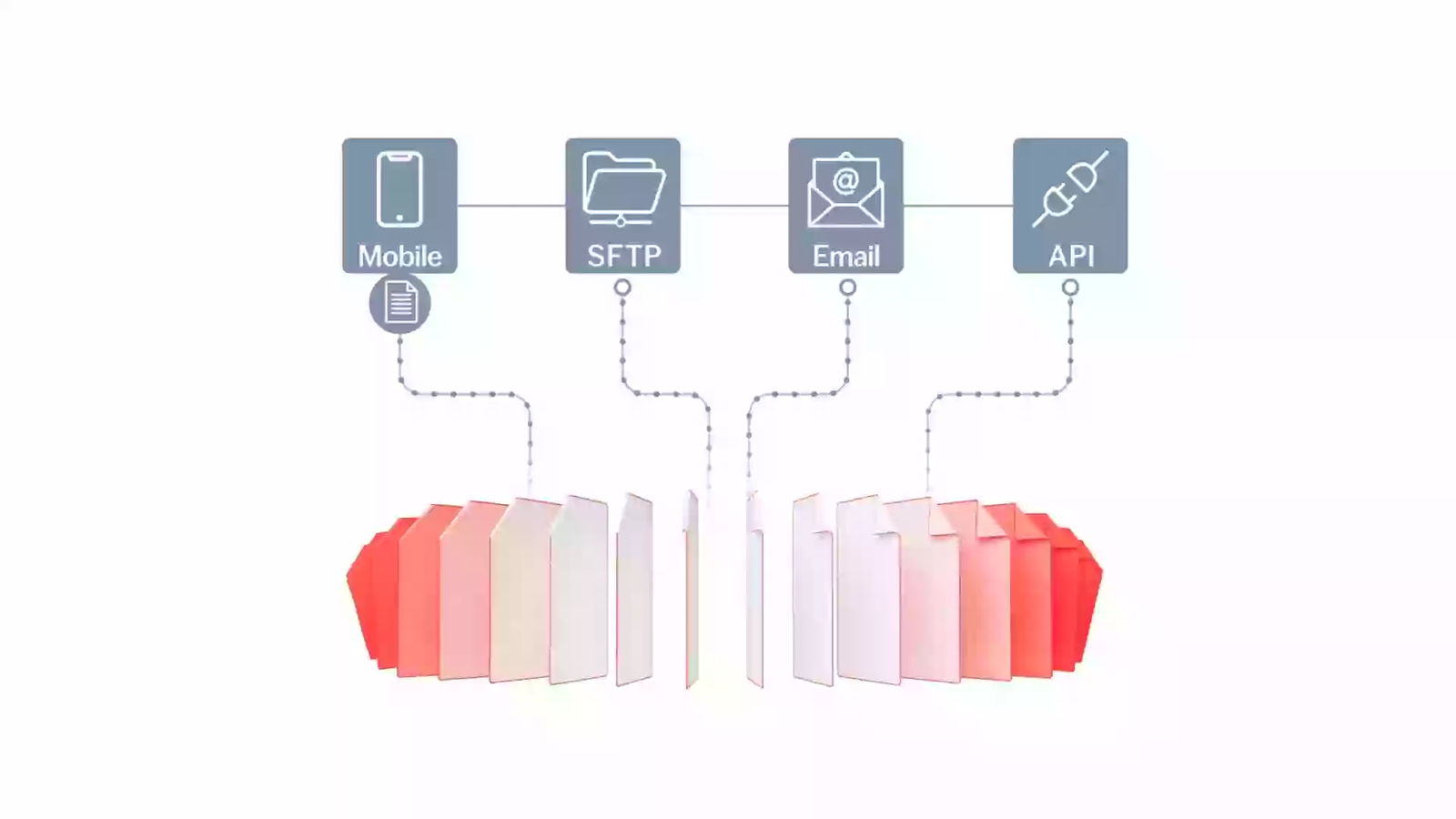
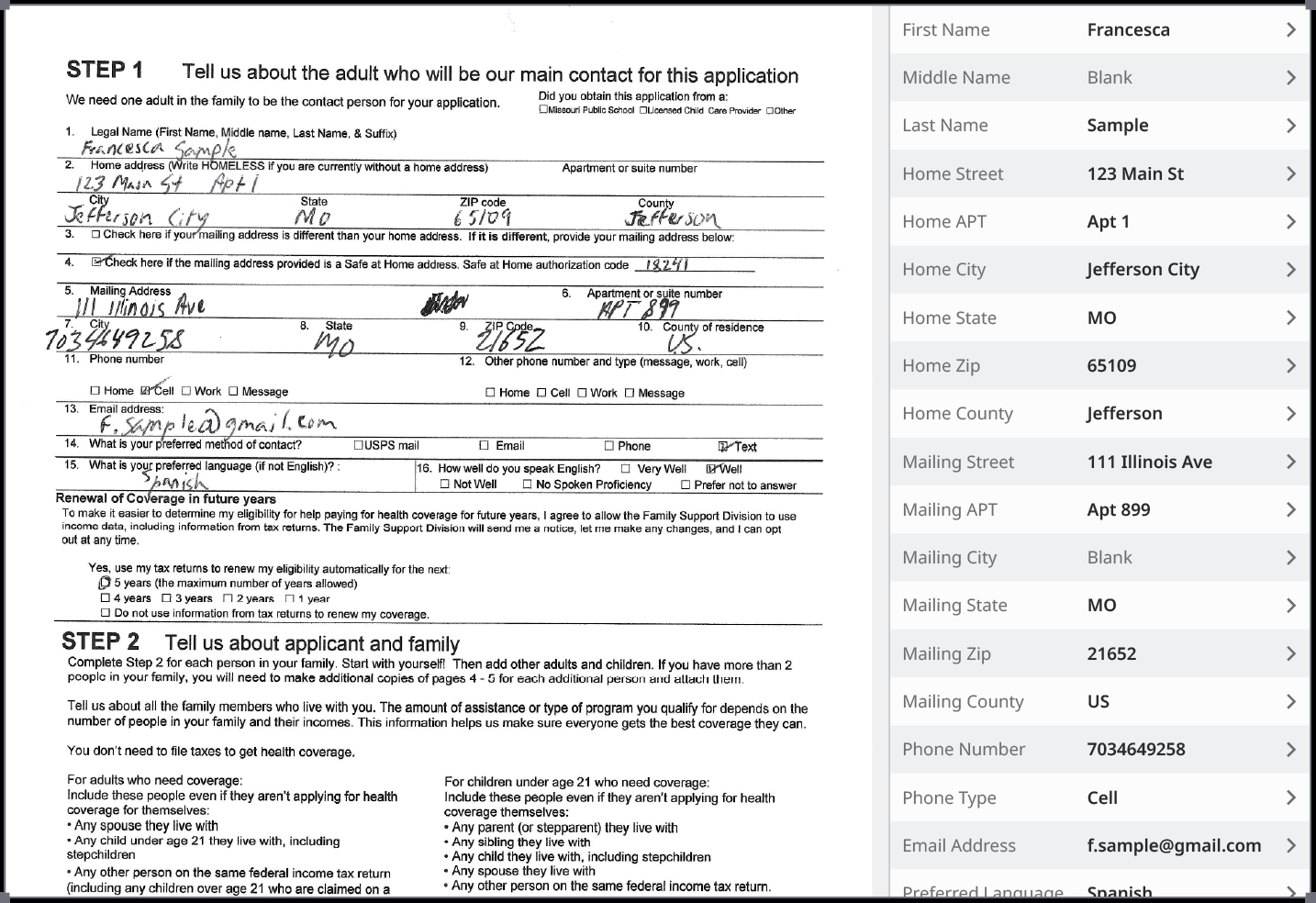
Hyperscience sells the Hypercell, which combines OCR, computer vision, NLP, its own machine-learning models and LLMs to read documents including handwriting and poor-quality scans. The platform covers more of the workflow than an extraction API does: human-in-the-loop and AI-in-the-loop review, redaction and masking for PII, and agentic workflow orchestration to route work after extraction. Deployment is the strongest differentiator. Hyperscience supports SaaS, a customer private tenant on AWS, Google Cloud or Azure, on-premises, and fully air-gapped environments delivered through partners including Google Distributed Cloud and HPE. Pricing is volume-based rather than per-seat, and Hyperscience states that unit cost per page falls as volume rises.
Best for: regulated and public-sector teams processing handwritten forms where data cannot leave the building.
Pros - Air-gapped deployment is offered as a supported configuration, not an exception - Handwriting and degraded scans are a stated design target, not an edge case - Redaction and masking are built in, which matters for FOIA, GDPR and privacy workflows - Volume-based pricing avoids per-seat licensing for large review teams
Cons - The "99.5% accuracy and 98% automation" figures are Hyperscience's own customer claims, not audited results - No public pricing; the entry point is oriented to enterprise volumes rather than small teams - Air-gapped delivery runs through partners like Google Distributed Cloud and HPE, adding a third party to the deployment - Breadth of the platform means a longer implementation than a plain extraction API
3. Microsoft Azure AI Document Intelligence
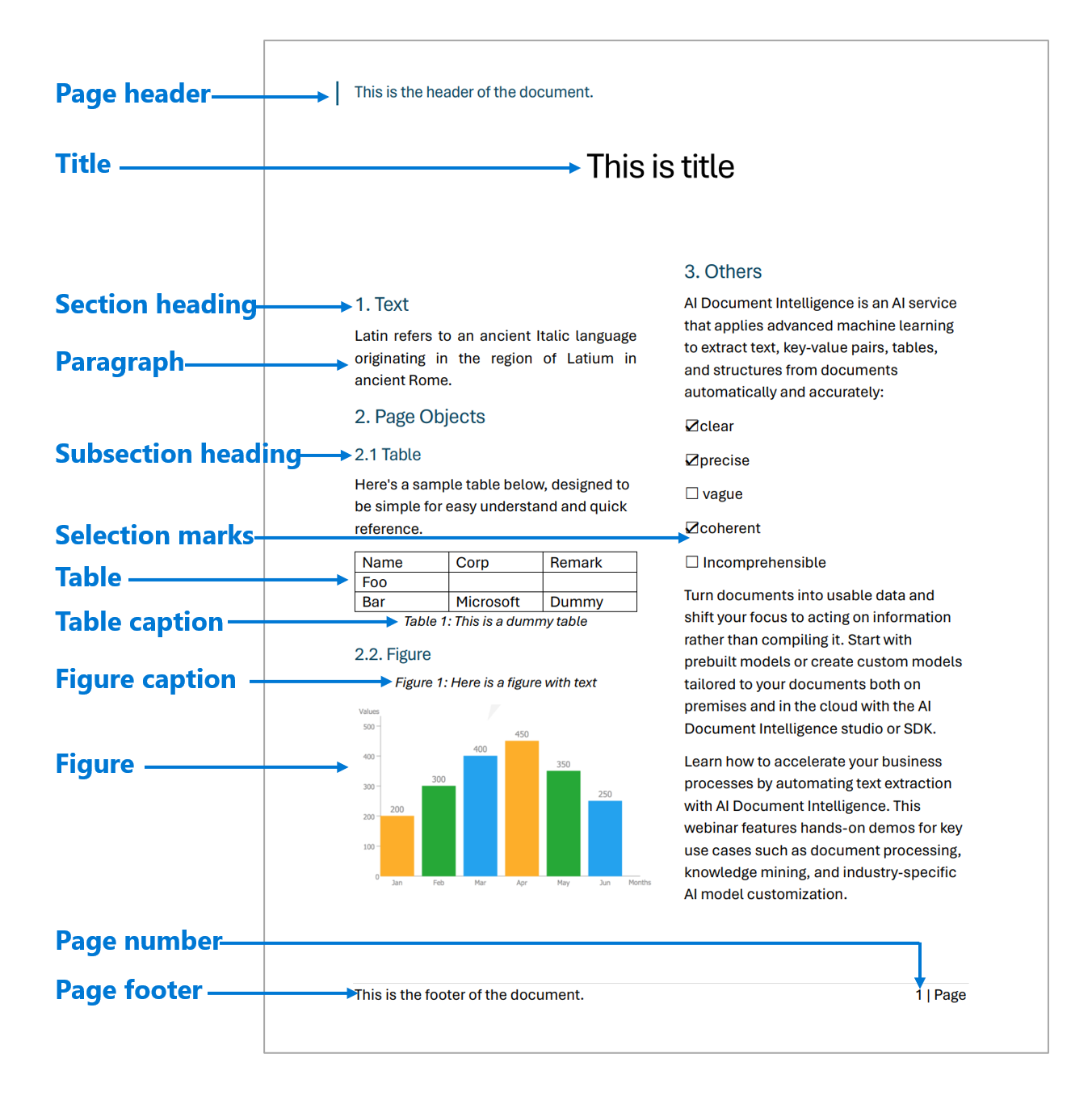
Azure AI Document Intelligence is Microsoft's document extraction service, formerly Form Recognizer. It offers a Read model for OCR, a Layout model that detects tables, titles, paragraphs and selection marks, and prebuilt models for a defined list of business documents — invoice, receipt, ID, W-2, 1098 tax forms, health insurance card and contract. Custom classification and custom extraction cover document types the prebuilt models don't. Both web API and container instance types are available, so processing can run inside your own network. The service includes a free tier of 500 pages per month, and billing is per 1,000 pages with separate rates for Read, prebuilt and custom models.
Best for: teams already on Azure that need prebuilt extractors for common business forms.
Pros - Prebuilt models for a specific named list of documents, including US W-2 and 1098 tax forms - Container deployment option keeps document data inside your own environment - 500 pages per month free tier makes evaluation genuinely zero-cost - Consumption billing per 1,000 pages, with no seat licenses
Cons - It is an extraction service, not an end-to-end IDP workflow — review queues and routing are yours to build - Rates rise steeply from OCR to prebuilt to custom extraction, so cost depends heavily on which model you need - Prices render dynamically on the pricing page rather than appearing as static text, and commitment-tier discounts surface through the portal and pricing API rather than the marketing page - Ties document processing to Azure regions and identity, which is friction in a multi-cloud estate
4. Google Cloud Document AI
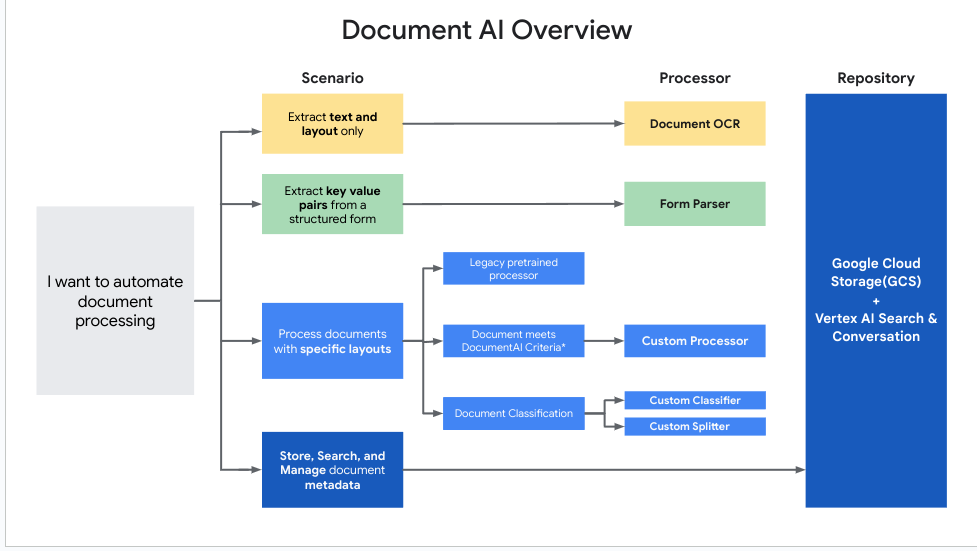
Google Cloud Document AI is organized as processors you call individually. Enterprise Document OCR digitizes text; Form Parser pulls key-value pairs from structured forms; Layout Parser extracts structure and performs chunking, which is aimed squarely at retrieval pipelines rather than data entry; custom extractors, classifiers and splitters handle specific layouts. Output lands in Cloud Storage and feeds Vertex AI Search. Pricing is published per 1,000 pages, as of September 2026: the first 1,000 pages of Enterprise Document OCR are free, then $1.50 per 1,000 pages up to five million pages a month and $0.60 per 1,000 above that. Form Parser is $30 per 1,000 pages up to one million and $20 above. Layout Parser, including initial chunking, is $10 per 1,000 pages. A page is one image, or one page of a PDF. Google states you are not billed for failed requests returning 4xx or 5xx codes.
Best for: teams that need high-volume OCR plus layout-aware chunking to feed a RAG or search system.
Pros - Per-page prices are published with explicit volume tiers, so cost modeling is straightforward - Layout Parser produces chunks intended for retrieval, which suits enterprise RAG pipelines directly - Failed requests (4xx/5xx) are not billed - OCR at $0.60 per 1,000 pages above five million is among the lowest published rates in this list
Cons - Form Parser costs 20 times the OCR rate — structured extraction, not reading text, is where the bill lands - Some processors are restricted to limited-access customers and require submitting a request form - No built-in human review or exception-handling workflow; you assemble that yourself - Results are wired to Cloud Storage and Vertex AI Search, which deepens GCP commitment
5. UiPath IXP
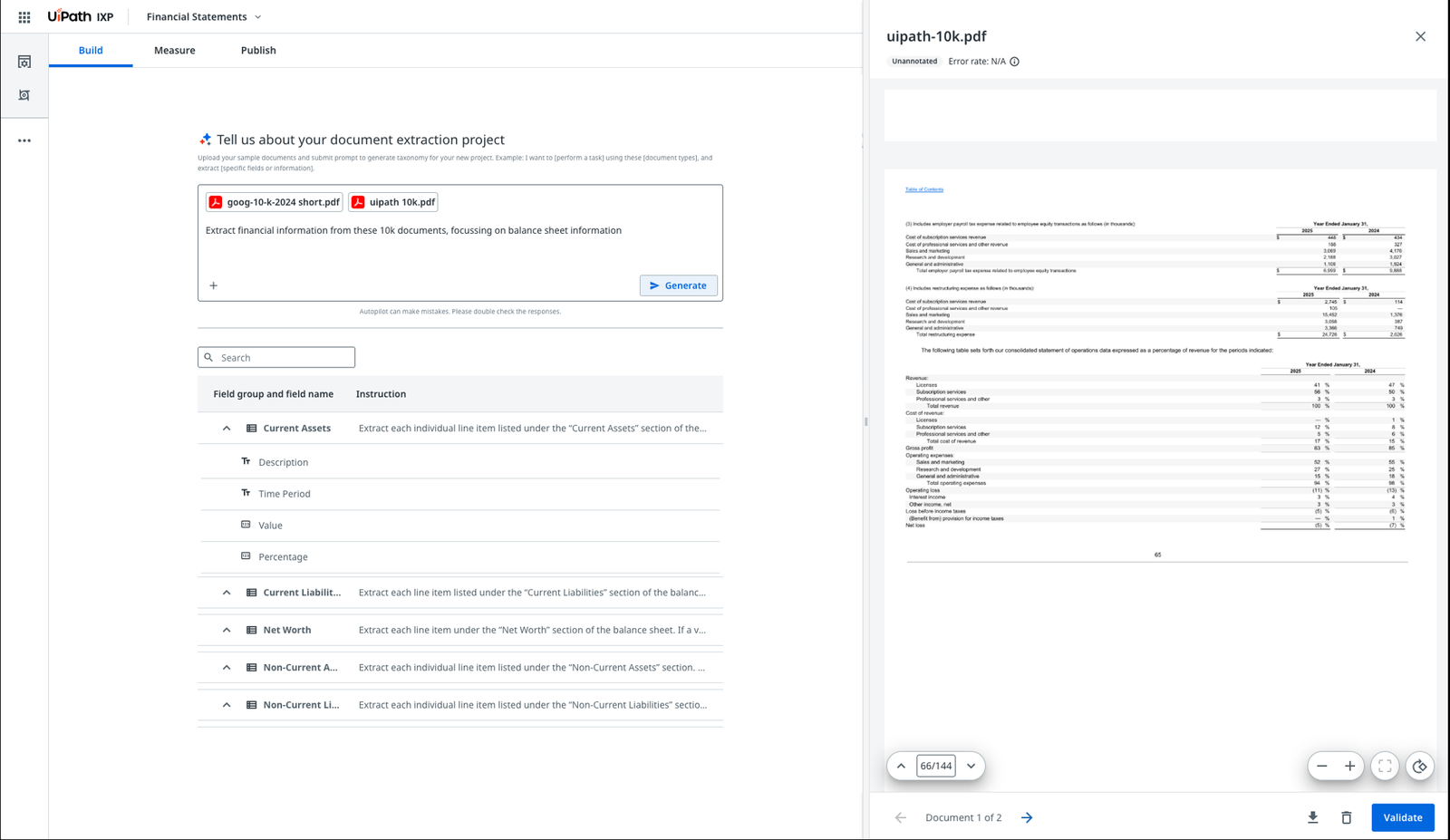
UiPath IXP — Intelligent Xtraction & Processing — is the company's consolidated document product, bringing together the existing Document Understanding and Communications Mining capabilities with a prompt-driven generative extraction path for unstructured and complex documents. In practice that means you can describe an extraction project in a sentence, upload sample documents, and have IXP generate a field taxonomy you then refine. Covering inbound email alongside documents is unusual in this category. In April 2026 UiPath made IXP available on Google Cloud Marketplace, with Gemini as the default third-party model for new IXP projects. Document Understanding continues to exist as a standalone service in Automation Cloud, reachable through IXP's structured and semi-structured documents capability.
Best for: organizations already running UiPath automations that want document data feeding those workflows.
Pros - Handles documents and inbound communications such as email in a single product - Prompt-driven project setup generates a starting taxonomy from sample documents - Available through Google Cloud Marketplace, which simplifies procurement for Google Cloud customers - Feeds directly into existing UiPath orchestration and agentic workflow tooling
Cons - Most of the value assumes you already own and run UiPath; as a standalone document tool it is a harder sell - The product boundary is confusing — Document Understanding still exists separately alongside IXP - No pricing published on the product page - Defaulting new projects to Gemini introduces a dependency on a third-party model outside UiPath's control
6. Rossum
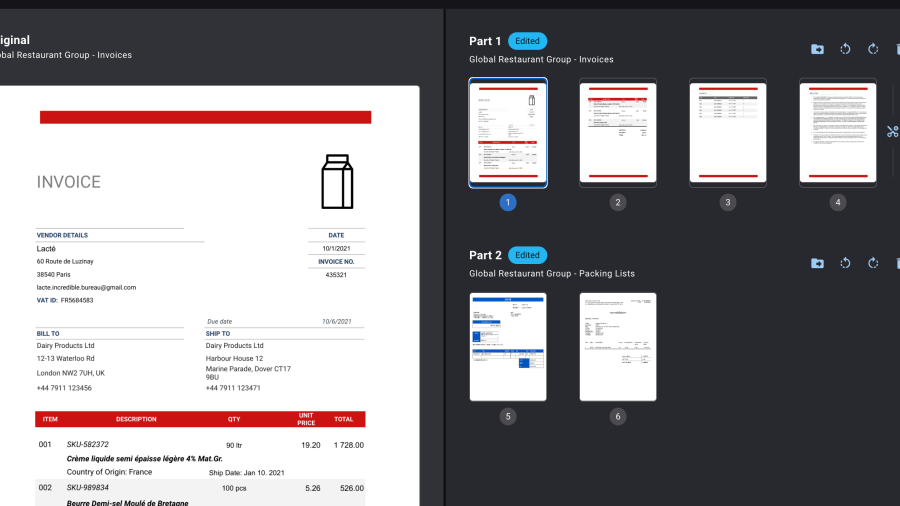
Rossum is deliberately narrow: transactional business documents — invoices, purchase orders, packing lists, order confirmations — processed end to end. Its Aurora AI models sit under a workflow that includes document splitting and sorting, business rules, approval routing, master-data matching, duplicate detection, audit logs and e-invoicing compliance features. Founded in 2017, Rossum was acquired by Coupa on 12 May 2026, announced at Coupa Inspire; the two had partnered since 2024, with Rossum's extraction embedded in Coupa's accounts-payable products. Rossum publishes an entry price — the Starter plan begins at $18,000 per year with unlimited seats and ingestion by email or API — with higher Ultimate tiers quoted on request and a 14-day free trial.
Best for: accounts-payable and order-management teams with high volumes of transactional paperwork.
Pros - Publishes a starting annual price, which almost no enterprise IDP vendor in this list does - Unlimited seats on the entry plan, so adding reviewers doesn't change the bill - Narrow focus shows up as concrete tooling: splitting, sorting, master-data matching, duplicate detection - E-invoicing features aimed at upcoming compliance mandates
Cons - Now owned by Coupa, so roadmap priorities will reasonably favor Coupa's source-to-pay stack — a strategic risk if you aren't a Coupa customer - The $18,000 annual floor is high for low or occasional volumes - Intentionally scoped to transactional documents; not a general-purpose platform for contracts or unstructured content - Pricing above Starter is quote-only, so total cost at scale isn't knowable in advance
7. Nanonets
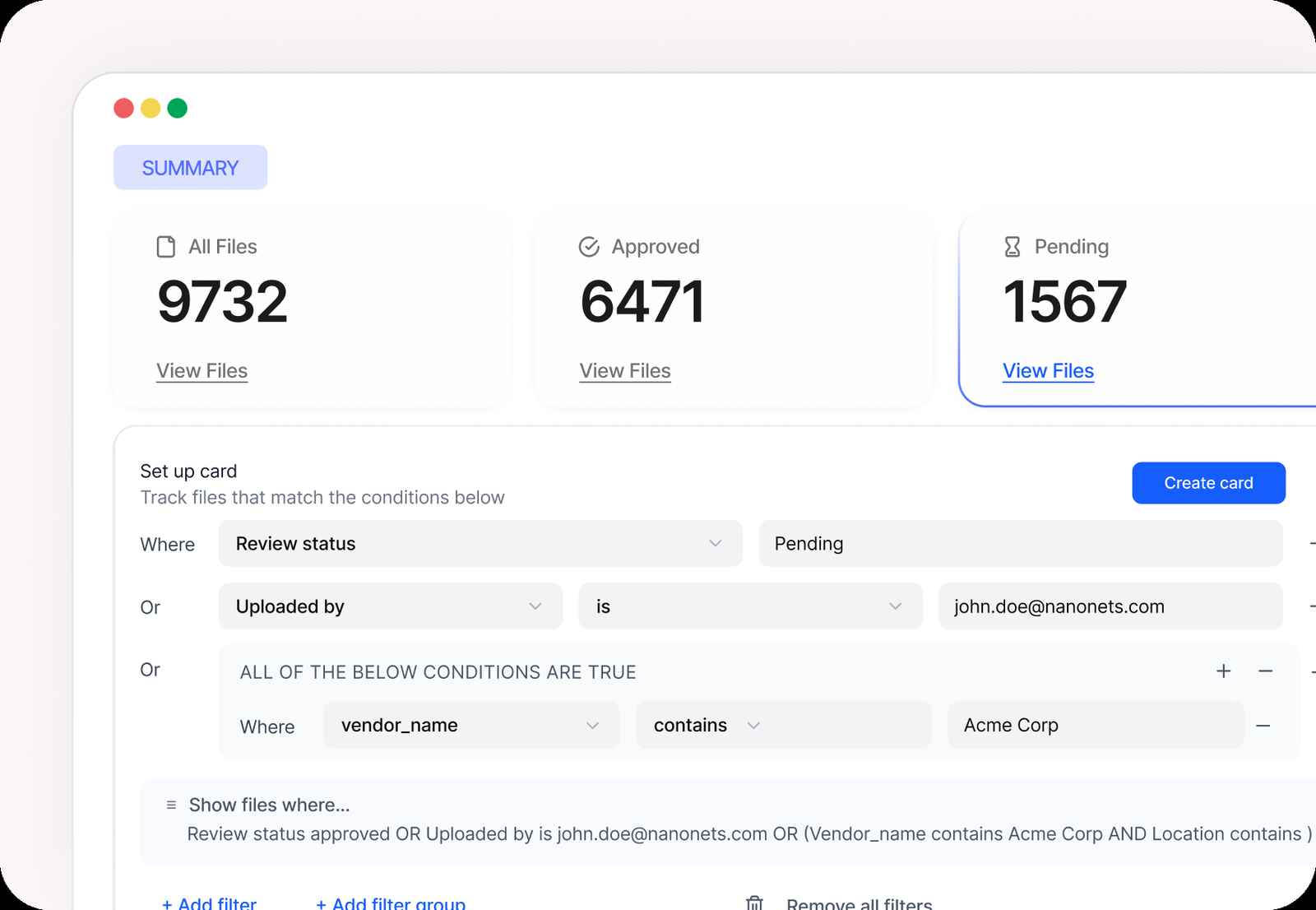
Nanonets is the most self-serve option here. Its workflow builder composes documents pipelines from blocks — extraction, classification, barcode and signature detection, generative AI steps, and custom Python for logic the platform doesn't provide — plus connectors to ERPs and databases. Billing follows that structure: instead of per-page pricing, you buy credits and spend them per block. The Starter tier begins free with $50 in credits and no card, then $100 per month for 100 credits. Nanonets states a complex AI block costs $0.30 and that a typical processing workflow runs four to six blocks per document. Growth and Enterprise tiers add volume discounts of up to 40%, and Enterprise adds SAML SSO and SCIM, role-based access control, HIPAA and SOC 2 compliance, private cloud or on-premises deployment, data residency in the US, EU or APAC, and a whitelabel UI.
Best for: developer-led teams that want a document workflow running this week and billed by usage.
Pros - Free to start with $50 in credits and no card required, which makes real evaluation trivial - No platform fee and no seat licenses — you pay for blocks that execute - Custom Python blocks let you handle business logic the platform doesn't cover natively - Private cloud and on-premises deployment plus US/EU/APAC data residency on Enterprise
Cons - Credit-and-block billing is harder to forecast than per-page pricing, because cost depends on how many blocks your workflow uses - The "under $2 per invoice end-to-end" figure is Nanonets' own estimate and assumes a four-to-six-block workflow - Compliance features — HIPAA, SOC 2, SSO, RBAC, residency — are gated to the Enterprise tier - Smaller vendor than the hyperscalers and enterprise pure-plays, which matters in conservative procurement
How to choose
If documents can't leave your network, the shortlist is short: Hyperscience for air-gapped and handwritten work, ABBYY Vantage for containerized on-premises deployment, Azure AI Document Intelligence if you want a container from a hyperscaler, or Nanonets Enterprise.
If you mainly need text and structure for a retrieval system, Google Cloud Document AI's Layout Parser at $10 per 1,000 pages is the direct answer, and its OCR rates are the cheapest published here at volume.
If your documents are invoices and orders, Rossum is purpose-built — with the caveat that its future is now tied to Coupa's roadmap.
If you already run UiPath, IXP is the path of least resistance, and its coverage of inbound email is a genuine advantage.
If you want to be processing documents by Friday, Nanonets' free credits and self-serve signup beat every enterprise procurement cycle in this list.
If your document mix is wide and unusual, ABBYY's skills catalog is the largest starting library, and Amazon Textract — not ranked here, since it is an extraction API rather than a platform — is worth pricing alongside it, at $1.50 per 1,000 pages for raw OCR and $50 per 1,000 for forms as of September 2026.
One thing every option shares: none of them reach 100% accuracy, and all of them assume some documents get looked at by a person. Budget for the review queue, not just the API call. That is the same lesson visible across data annotation platforms — human judgment stays in the loop, and the tooling around it is what determines cost.
Frequently Asked Questions
What is intelligent document processing?
Intelligent document processing is software that converts documents into structured data. A platform classifies an incoming file, extracts specified fields, validates them against rules or master data, routes uncertain results to a human reviewer, and delivers clean records to a downstream system such as an ERP or database.
How is IDP different from OCR?
OCR only converts images of text into machine-readable characters. IDP adds the layers around it: deciding what kind of document arrived, identifying which values matter, checking them against business rules, and managing human review of low-confidence results. OCR is one component inside an IDP platform, not a substitute for one.
How much does intelligent document processing cost?
It varies by model. Google publishes $1.50 per 1,000 pages for OCR and $30 per 1,000 for form parsing. Rossum starts at $18,000 per year. Nanonets bills credits per workflow block from $100 monthly. ABBYY, Hyperscience and UiPath quote privately, so budget for a sales process.
Can IDP platforms run on-premises?
Several can. Hyperscience supports on-premises and fully air-gapped deployments through partners. ABBYY Vantage ships containers for on-premises or private Azure using Docker and Kubernetes. Azure AI Document Intelligence offers container instances. Nanonets offers private cloud or on-premises on its Enterprise tier. Google Cloud Document AI is cloud-only.
Do IDP platforms still need human review?
Yes. Every platform here includes or assumes a review step for low-confidence extractions, and vendor accuracy claims describe typical results rather than guarantees. The practical question is not whether humans review documents but how efficiently the platform surfaces only the cases that need attention.
Editor's note — sources: Google Cloud Document AI pricing and product overview; Amazon Textract pricing; Azure AI Document Intelligence pricing and layout documentation; ABBYY Vantage and ABBYY Marketplace; Hyperscience Hypercell; UiPath IXP and UiPath newsroom; Rossum pricing and Coupa's acquisition announcement; Nanonets pricing. Accuracy and automation percentages are vendor claims, attributed as such. Pricing verified September 2026. Analysis is Edgewisely's own.